Barbershop with a team
Each barber with his own agenda and statement, and you out of the middle.
Marcos books with Rafa, Léo with Bia, and Caio walks in. Each shows up on the right chair, and each barber sees his own statement.
30 days free, no card.
63% · 7.5 of 12 chair-hours
Chair 1
Chair 2
Chair 3
14:00 15:00 16:00 17:00 nowStill figure: the final frame of the animation.
A day like this
-
8:50 am
You open the agenda on your phone and see the day by chair. Two clients booked overnight in the chat, with nobody there to answer.
-
11:00 am
A client walks in. You start a walk-in with the barber who is free, the visit is born in progress on a free chair, and it goes into his agenda.
-
1:30 pm
Bia has to leave early. You block her afternoon, and the system lists the bookings that fall in that time. You choose to keep them or cancel them.
-
6:00 pm
Marcos pays for the R$ 50 haircut by Pix, straight into the shop’s Mercado Pago. When Rafa finishes the visit, his 50% commission, R$ 25, goes onto his statement.
-
End of the period
You issue the statements. Each barber opens his and marks it seen.
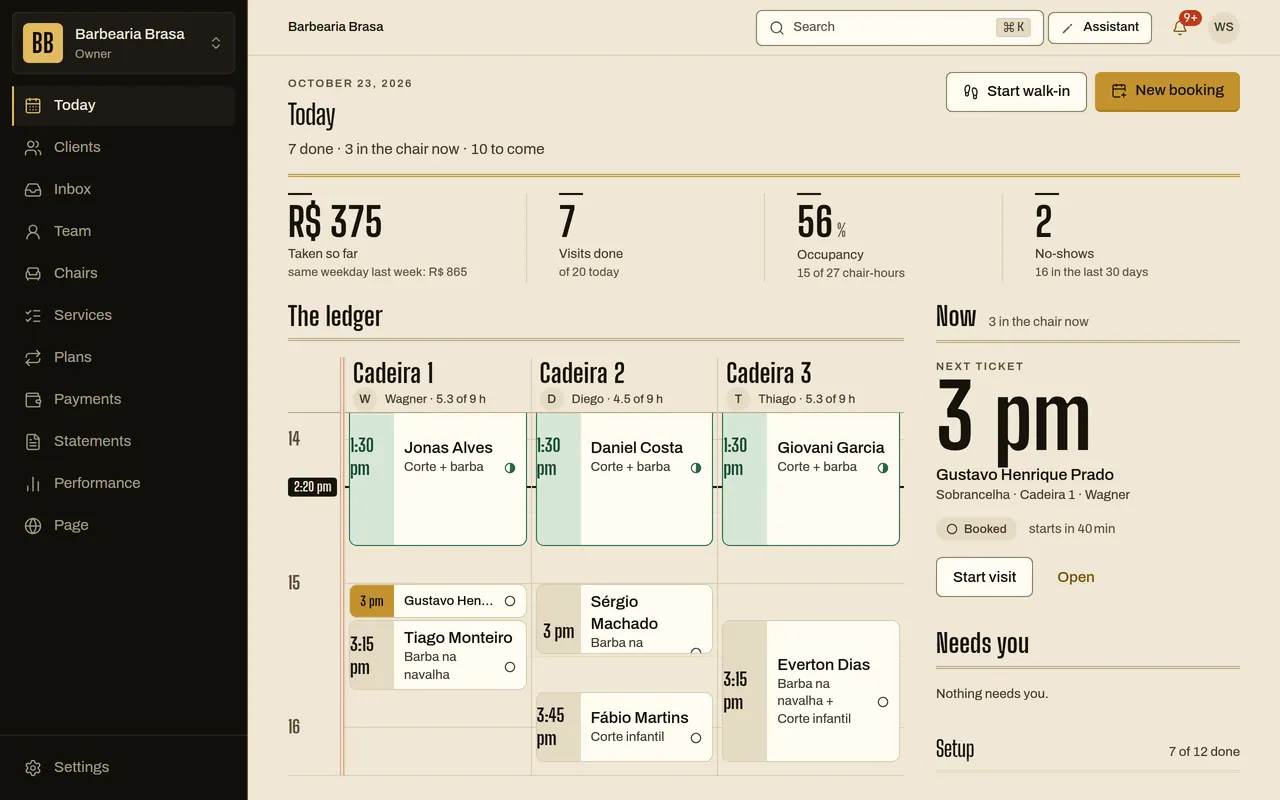
What changes
-
Each barber has his own agenda and page.
Each barber sees his own day, blocks his own hours and opens his own statement. The owner and admins see everything.
Online booking and agenda -
The statement closes on each one’s rule.
The rule is yours, barber by barber: commission, chair rent or both.
Commissions and statements -
You see what each chair earns.
Hourly occupancy shows where the agenda fails.
Occupancy and performance
Start small
- 1service with a price
- 1opening hour
- 1name for the link
To put the page live, the system asks for the shop’s name and city, the link name, 1 service with a price and 1 opening hour. The first chair is already created. Then you invite the barbers by email.
Questions
Does the barber need an account?
Yes. You invite him by email, and he creates his account from the invitation.
What if a barber works at two shops?
One person can join more than one shop with the same account and switch between them.
What happens if I go over the plan’s limit?
The system only stops you adding more barbers or chairs. Nothing is deleted.
Does the client pick the barber?
Yes, or asks for “any barber”. Then the system picks the one with the fewest minutes booked that day.