Commissions and statements
50% of a R$ 50 haircut is R$ 25, and the R$ 25 is recorded for the barber when the visit ends.
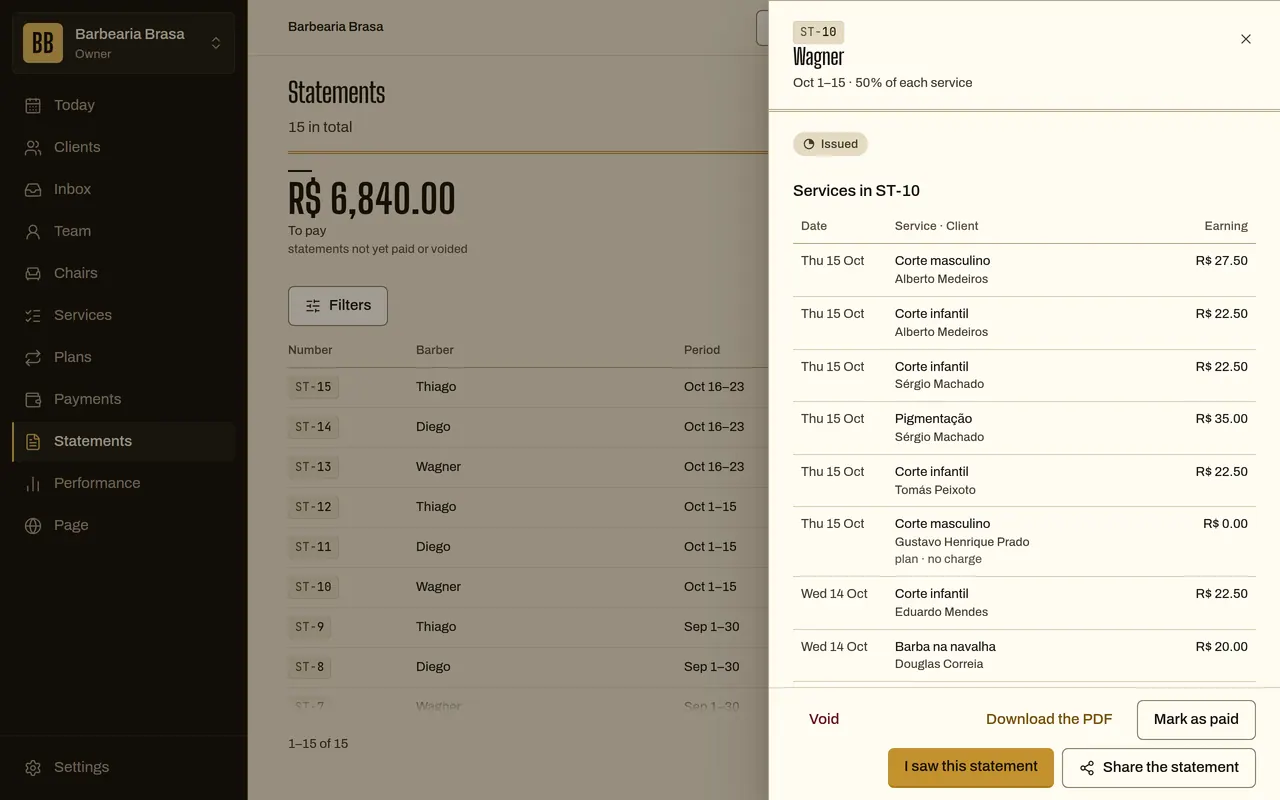
Every service goes onto the barber’s statement with the rule you chose. They open it, see the total and mark it seen. You open no spreadsheet.
30 days free, no card.
How it works
From each barber’s rule to the statement being paid.
-
You pick the rule
- What you do
- For each barber, pick commission (a percentage), chair rent (an amount per week or per month) or both.
- What the system does
- Each service keeps the agreed rule.
- What the other person sees
- Nothing. The rule is between you and the barber.
Rafa’s ruleExample
- Commission
- 50% of each service
- Chair rent
- R$ 600 a month
- Both
- rent plus commission
-
The visit ends
- What you do
- Close the visit.
- What the system does
- Writes the barber’s share and the shop’s: on a R$ 50 haircut at 50%, R$ 25 each.
- What the other person sees
- The normal service receipt.
One haircut, at closingExample
- Price of the day
- R$ 50
- Barber’s share
- R$ 25
- Shop’s share
- R$ 25
-
The statement closes
- What you do
- Check the draft, adjust a line if needed and issue it.
- What the system does
- When the period closes, drafts each barber’s statement: services, rent, adjustments and advances. Once issued, the statement doesn’t change.
- What the other person sees
- The barber gets a notice that a statement was issued.
The statement’s pathExample
- Open
- you check and adjust
- Issued
- no longer changes
- Seen
- the barber marked it
- Paid
- you marked it
-
The barber checks
- What you do
- Wait for the “seen”.
- What the system does
- Shows every service in the period and lets them download the statement as a PDF or send the link.
- What the other person sees
- The barber is the one who sees it: they mark it seen.
-
You pay
- What you do
- Pay outside the system and mark the statement as paid.
- What the system does
- Registers the payment date.
- What the other person sees
- The barber sees “Paid” on the statement.
How the statement splits a haircut
The statement keeps the agreed rule for each service. Pick a rule and see each person’s share.
Rafa R$ 25 Shop R$ 25 Shop · R$ 600 a month chair rent
Statement · week of 27 Oct · 31 services · R$ 1,240
50% commission: Rafa R$ 25, shop R$ 25.
Still figure: the final frame of the animation.
Rules you control
- Default pay rule
- commission
- Rule types
- commission, chair rent (per week or per month) or commission plus rent
- Barber payment frequency
- monthly (weekly and biweekly too, set on the barber’s contract)
- Rule per service
- you can set an exception for one service
- Who sees the statement
- the barber themselves, you and any admin
- Statement state
- open, issued, seen, paid
What it does not do yet
- It doesn’t pay the barber: you pay outside and mark it paid.
- It doesn’t issue invoices (NFS-e) and doesn’t pay tax for you.
- The deal with the barber is yours. The system keeps the rule and doesn’t replace your accountant.
Questions
Does the barber see what the others earn?
No. Each one sees only their own statement.
Can I change the commission mid-month?
Yes. Each visit counts under the rule of the day it happened.
How does chair rent work?
You set the amount and whether it’s per week or per month. It goes on the barber’s statement as a rent line, and the barber keeps the full value of the services.
Can I adjust an amount?
Yes, with an adjustment or advance line on the open statement. Once issued it doesn’t change: you void the statement and issue another.
Do plan subscribers count?
Yes. The barber’s share of subscription plan uses appears as a plan line on the statement, when the cycle closes.
See also
- Subscription plans Monthly plans and packs of uses, charged to the client.
- Occupancy and performance Hours filled, hours empty and what each barber sells.
- Shop with a team Several barbers, each with an agenda and a statement.
- Shop with subscription plans Monthly plans and packs for the loyal client.